
Yesim eSIM Review 2026: What Worked & What Didn’t
I personally purchased and used a Yesim eSIM, and it delivered on what matters most. Fast speeds, simple setup, overall easy to use. But there are a few things I wish I had known before buying. In this guide, I’ll cover the good and bad, plus tips if you’re thinking about getting one.
Last updated: June 14, 2026
Written by KJ, Managing Editor at eSIMStash
Currently Testing in South Korea • How We Test • Purchase Receipt
Some links on this page are affiliate links. If you buy through them, we may earn a small commission at no extra cost to you. It helps keep our testing going, so thank you! All opinions are our own, and affiliate partnerships do not influence our reviews or ratings. Read our full disclosure →

Summary: Yesim’s Claims vs. My Quick Take
| 1. Simple Installation | Yes Yesim claims one-click, but note that activation requires a few extra clicks in practice |
| 2. eSIM Coverage | Flexible Single-country, regional, global, and Fly & Pay Plans available |
| 3. Pricing | Mid-range Typically more expensive than BNESIM and Airalo for fixed plans |
| 4. Speed & Browsing Experience | Very fast 5G Up to 210.2 Mbps in Seoul. Used Google Maps, Naver Maps, TikTok, Instagram, etc. with no issues |
| 5. Mobile Hotspot | Available Worked well but initially had to troubleshoot with support |
| 6. Unlimited Plans | Yes Fixed 1, 7, 15, 30-day plans only — Fair Usage Policy applies |
| 7. VPN | Yes Available for iPhones at no extra cost |
| 8. Phone Number | Yes Mainly for OTPs — may not work on all platforms |
| 9. Call & Text Plan | No |
| 10. Reusable eSIM | Yes Top up or buy a new plan on the app without reinstalling |
| 11. Interface | User-friendly Room for improvement |
| 12. Refund Policy | Very flexible |
| 13. Customer Support | Great Human response in under 2 minutes |
| 14. Referral Rewards | Generous EUR 5 per successful referral — spend EUR 5 first to unlock your referral code |
| 15. Cashback | 5% On every purchase |
Would I use Yesim again?
Overall, my experience was satisfying. So, yes, I would use it again and would even recommend it to my family. While there are cheaper alternatives, Yesim provided what I am essentially looking for in an eSIM: a stress-free installation, 5G data throughout the day, and responsive support. As I documented with screenshots below, it only took me less than 10 clicks and 4 minutes to start using my eSIM on my iPhone 15 Pro in Seoul. I also enjoyed high-speed 5G internet download speeds of up to 210.2 Mbps throughout the day (connected to major telco companies), and got a human response from their support team for my troubleshooting inquiry in less than 2 minutes.
However, do note that the free VPN is only available for iPhone users and that virtual numbers come at an extra cost.
Yesim Promo Code
If you decide on getting Yesim, you can save on any plan by booking with our 15% off coupon code ESIMSTASH (tested and verified on June 2026).
Who I Would Recommend Yesim eSIM To
For first-time eSIM users. The installation is offered in four methods, but they do offer a simple one-click activation feature. After turning on data roaming and turning off your home line (primary number), you can get connected in minutes. I was connected shortly to a 5G network after setup.
For most leisure tourists. The internet speeds were consistently fast — I had no issues using Google Maps, Naver Map, Instagram, TikTok, YouTube, Papago, and others. As a casual user, you can even receive incentives for inviting friends or family.
For heavy internet users. Yesim’s unlimited data plans will save you from frequent remaining data checking and additional top-ups. I am a heavy internet user, and while there’s public WiFi connection in Seoul, South Korea where I tested, I typically spent more than 1GB a day. Having no limits is best value for me.
For travelers bound to China. This is one of Yesim’s popular destinations, and for good reason. Yesim has built-in VPN for iPhone users that bypasses internet restrictions in China (Tiktok available). In this Reddit thread on r/travelchina that I found, a traveler actually discouraged travelers from using Yesim if traveling for more than 2 weeks. They experienced a speed reduction, but Yesim actually states the Fair Usage Policy on their website (where the local operator may reduce speeds depending on the user’s usage). I suggest reading both sides before purchase.
For business travelers. If you will rely on data for calling and texting through apps (Facetime or social media), it does the job. Yesim is probably not the right pick if you need a traditional voice plan. You may consider getting aloSIM eSIM that comes with a free international number and minimal credits for calls and texts.
For frequent travelers. Yesim is a convenient choice if you fly out a lot. Aside from their multi-country plans, their Pay & Fly Plan works in 170+ countries (including your home country) and is valid for 12 months. Neither I nor my friend who runs eSIMStash have availed this plan, but it is worth checking out.
Full Review & Test Experience of Yesim eSIM

I used Yesim in South Korea, consistently ranked among the countries with the fastest internet speeds in the world. I tested the eSIM in a quiet cafe in Yeouido, the financial and cultural part of Seoul, home to landmarks like the IFC Mall, Yeouido Han River Park, and the National Assembly Hall.
Before connecting, I checked Yesim’s website and saw that they claim partnerships with 800 operators worldwide. This includes LG in South Korea. Knowing that LG, KT, and SKT are the three major local telcos used by residents, I was curious whether Yesim would connect me to the same networks and whether that would translate to a local-level experience as a foreign traveler.
To find out, I ran different speed tests in two different times of day, tested mobile hotspot tethering on my laptop, and submitted a support request to see how fast and how the team would respond. Here is what I found.
1. Simple Installation
Tips: Install the eSIM one or a few days before your trip. Click the “Activate eSIM in 1 Tap” link or install on the app.
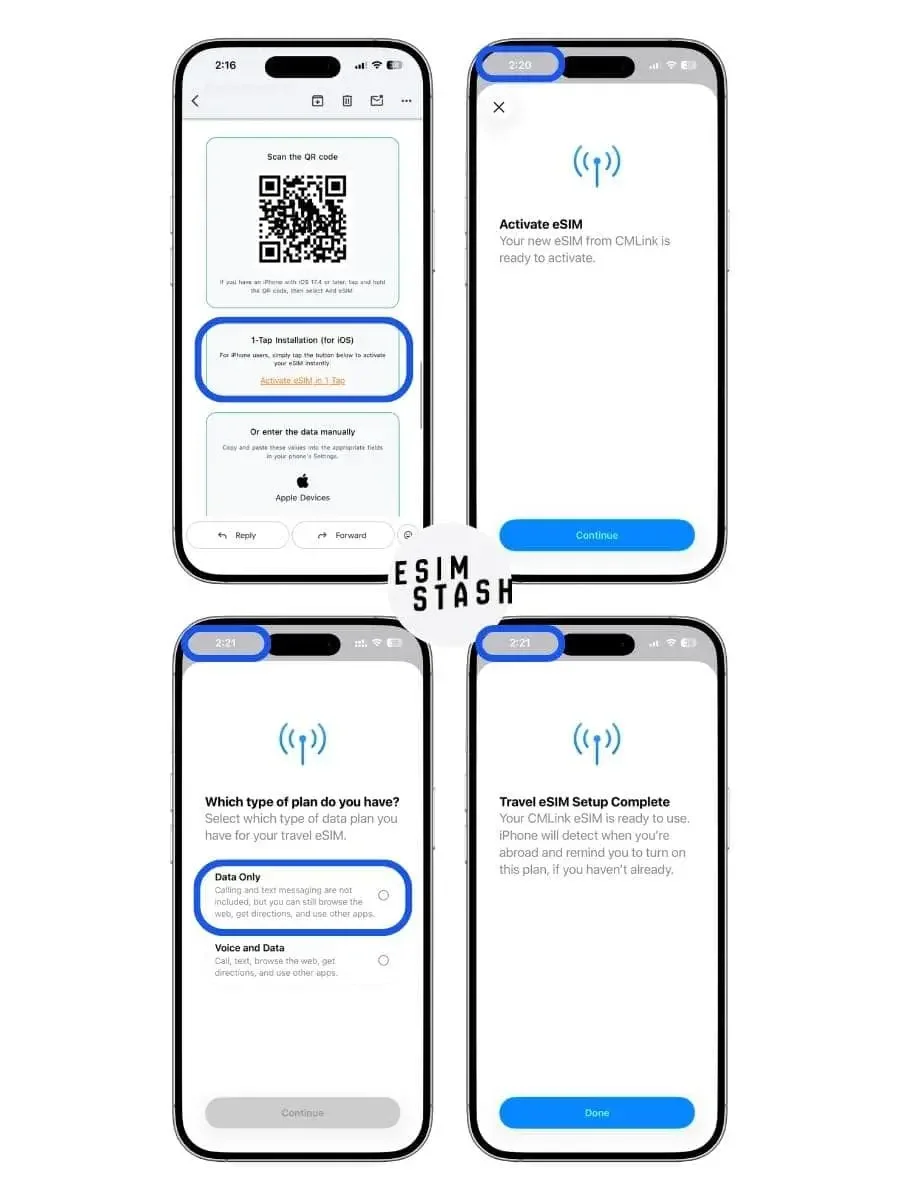
After purchasing a Yesim eSIM, I received an instant email at 2:16 PM containing four ways to get set up: In-app installation, QR code, activation link, and manual installation. On Yesim’s homepage, I saw “1-Click Installation” mentioned at least two times, so this is how I chose to proceed:
2:20 PM: I clicked the Activate eSIM in 1 Tap link on the email.
2:20 PM: The Cellular page in my iPhone’s setting appeared, along with a pop-up that prompted me to activate the eSIM. I clicked the Activate button. (It then took less than a minute for the eSIM to connect to the carrier.)
2:20 PM: I clicked the Continue button after seeing that the eSIM was ready to activate.
2:21 PM: I was asked two questions: “Where will you use this eSIM?” and “Which type of plan do you have?” I chose Abroad and Data Only, respectively.
2:21 PM: I saw the “Travel eSIM Setup Complete” message.
Since I was in South Korea already, I proceeded to use the eSIM. I followed the steps listed on the email:
2:22 PM: I went to Settings > Cellular. Under SIMs, I selected my Yesim eSIM, which was named “Travel - CMLink” by default. (Later on, I renamed it to “Travel-CMLink (Yesim) for easy reference.”)
2:22 PM: I toggled Turn on This Line
2:23-2:25 PM: I thought I should be getting internet already by this time, so I’ve been hitting refresh on my browser. But I realized there there were a couple of steps that I missed.
2:25 PM: I turned on Data Roaming in my Yesim eSIM, turned off my Primary SIM Card (so I won’t be charged for roaming), and switched Cellular Data to Yesim (“Travel-CMLink”).
2:26 PM: I finished activating my eSIM and visited esimstash.com. 5G was visible on my iPhone’s upper right bar.

As you can see in the screenshots, Yesim connected me to LG U+ as they have claimed on their website. After completing installation and activation by 2:26 PM, I was already browsing eSIMStash at 5G speeds. This suggests that Yesim users are able to connect to the same network infrastructure that residents use daily.
Not counting my 2-minute blooper, installation and activation took 4 minutes total. Yesim calls it 1-click, but it’s four minutes and a learning curve for me. But once connected, it worked flawlessly.
Field notes

—If you install via the app, you may see a warning that says “installing the eSIM outside your destination country will make it invalid and impossible to restore”. This sounds alarming, but you can proceed anyway. The confirmation email I received after purchase states that home country installation is possible, and as you can see in the screenshot above, I verified this directly with Nick from the Yesim Chat Support Team, who confirmed Yesim eSIMs can be set up before arrival. (In case you purchase a multi-country or Pay & Fly plan, I would suggest reaching out to their Support Team for proper instructions. This part was not covered by this test.)
— Installing the eSIM requires an active internet connection. I would recommend installing your Yesim eSIM in your home country, not when you arrive in your travel destination (in case there is no good internet signal at the airport). Still, do note that you will only be able to use the eSIM to connect online once you are in that destination.
— I do not recommend setup via QR code. This requires a separate device where you would need to scan the QR code from. Plus, just like the “1-tap link” on the email that you only need to click, the code will also just take you to the same Cellular Settings Page where you will be prompted to activate the eSIM. That said, if you want to proceed with this method, do remember that the smartphone that you will use to scan is the device where the eSIM will be installed. If you accidentally install in a different device, you will not be able to transfer the eSIM to another.
—Before you purchase a Yesim eSIM, make sure phone is compatible and unlocked.
2. eSIM Coverage
For my test, I purchased a single-country eSIM for South Korea. But Yesim’s coverage goes well beyond that. They also offer multi-country options including an Asia Pacific eSIM and a Global eSIM, depending on how far your trip takes you.
One thing I noticed while comparing plans is that Yesim bundles Japan and South Korea into the same Asia Pacific package, alongside countries like Mainland China, Thailand, Singapore, Malaysia, and the Philippines.
From lurking Reddit while researching this review, I noticed that Japan and South Korea are two countries that are commonly visited together in Asia. Many itineraries involve flying between cities like Tokyo, Osaka, and Seoul within the same trip, so having one eSIM that works across both countries is genuinely convenient.
That said, pricing is not always Yesim’s strongest advantage (as of this article’s last update, Yesim’s Asia Pacific plan starts at $34.8 for 20GB valid for 30 days.). If your trip is limited to China, Japan, and South Korea only, Nomad currently offers a more targeted East Asia plan at around $31 for the same 20GB and 30-day validity, noticeably cheaper for a narrower region.
Field notes
—While researching the Global eSIMs offered by Yesim, I noticed 4 different plans on their website: Unlim Day Pass, Global Package, Global Plus Package, and Pay & Fly. If you are a frequent traveler who is looking for a single eSIM that works almost anywhere in the world, the options may be a little confusing. We have a table below to help explain the options:
| Plan | Inclusions | Get This If |
| Unlim Day Pass | Unlimited data for 10–80 days in 80+ countries. 1-year validity. Days can be used anytime. | Get this if you want flexible unlimited data across multiple trips. (Best for frequent travelers and heavy users.) |
| Global | 10–80GB fixed data (up to 1-year validity) or unlimited data for 7–30 days in 80+ countries. | Get this if your trips are spread throughout the year. (Best for light to medium data users.) |
| Global Plus | 5–40GB fixed data or unlimited data for 7–15 days in 140+ countries. | Get this if wider coverage matters more than price. (Best for travelers visiting many countries.) |
| Pay & Fly | $1.10 per GB in 170+ countries. 1-year validity. Pay only for what you use. | Get this if cost per GB matters most. (Best for pay-as-you-go travelers.) |
3. Pricing
There’s good value for money. That’s how I would put it after using Yesim. As an eSIM tester and leisure traveler, I needed less than 5 minutes to connect to the internet in Seoul. Then I was off to my itinerary, whether navigating to Gyeongbokgung Palace or finding the next bus to Gangnam. That hassle-free experience is worth the price to me.
That said, if pricing alone is your main consideration, there are providers that regularly offer lower prices than Yesim in several destinations. Below is a quick comparison of 10GB plans valid for 30 days across four destinations (prices verified as of this article’s last update and subject to change).
| Country | Yesim | BNESIM | Airalo |
|---|---|---|---|
| South Korea | $19.20 $32.40 10GB • 30 days • $1.92/GB | $6.95 10GB • 30 days • $0.70/GB | $19 10GB • 30 days • $1.90/GB |
| Thailand | $13.20 $31.20 10GB • 30 days • $1.32/GB | $6.95 10GB • 30 days • $0.70/GB | $11 10GB • 30 days • $1.10/GB |
| UK | $19.20 $32.40 10GB • 30 days • $1.92/GB | $13.92 10GB • 30 days • $1.39/GB | $19 10GB • 30 days • $1.90/GB |
| Mexico | $27.60 $96.00 10GB • 30 days • $2.76/GB | $6.95 10GB • 30 days • $0.70/GB | $18.50 10GB • 30 days • $1.85/GB |
| Check Rates | Visit Yesim → | Visit BNESIM → | Visit Airalo → |
I would place Yesim somewhere in the mid-range to premium category. BNESIM is usually the cheapest option among the three, while Airalo often sits close to Yesim depending on the country.
Still, there are a few extras worth considering beyond the raw rates. Yesim includes a free VPN for iPhone users, while BNESIM currently requires automatic top-up enabled to access its VPN feature. Airalo does not list VPN as a standard feature on its website.
All three providers also approach rewards differently. Yesim and Airalo both offer cashback programs regardless of payment method, while BNESIM limits cashback eligibility to purchases made using its e-Wallet system.
Consider these things before you buy, but if you want my two cents, I would pick BNESIM if I have an inflexible budget, and Yesim for the additional free and paid features.
Field notes

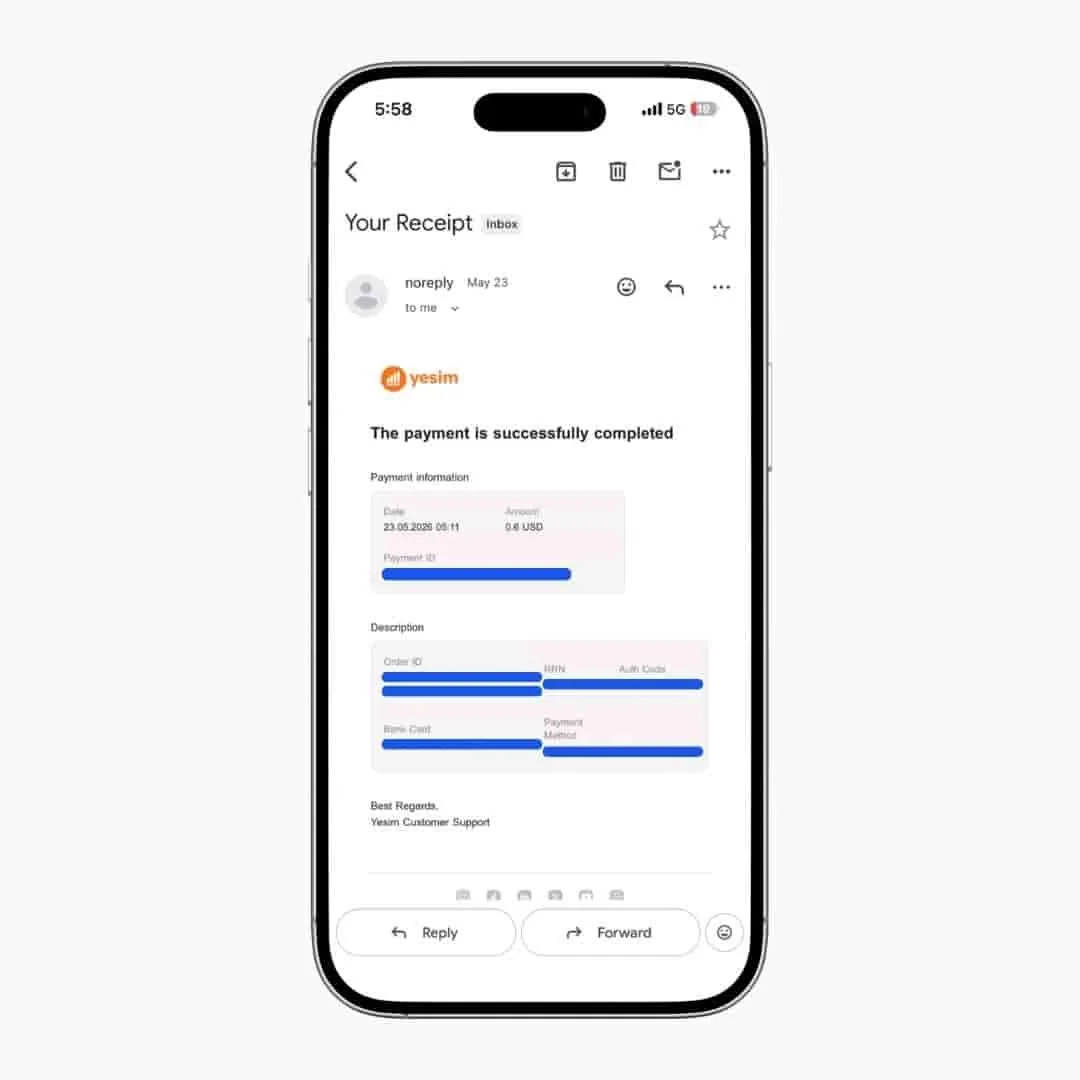
— Prior to purchasing a plan on May 22, 2026, I redeemed the Yesim promo code TRAVLISTS2025, which had given me a $6 credit when I first applied it on May 9, 2026. I used that credit toward a 1GB South Korea plan for 30 days, priced at $3.24. Even though my credit exceeded the plan cost, I still paid a $0.60 secure payment fee at checkout. This very small fee seems to apply regardless of any discount or promo code applied.
Worth knowing before you buy: the $0.60 charge will appear even if your total shows $0.00 after a discount.
4. Speed & Browsing Experience
In my testing, Yesim delivered download speeds of up to 210.2 Mbps in Seoul while connected to the LG U+ network, fast enough for streaming and hotspot use.
For context, South Korea ranked 6th globally in Ookla's April 2026 Median Country Speeds, with a national mobile median of 256.32 Mbps download, 24.48 Mbps upload, and 25ms latency. That gave me a useful benchmark going into the test.
Here are my results:
2:34 PM: 99.69 Mbps download via Ookla while my MacBook was connected through mobile hotspot. The lower speed was expected since tethering typically reduces performance slightly due to bandwidth sharing and hotspot overhead. Even so, the connection still felt fast during normal browsing.
2:58 PM: 210.2 Mbps download, 17.5 Mbps upload, and 43ms latency via Google's Internet Speed Test (powered by Measurement Lab) with hotspot disabled.
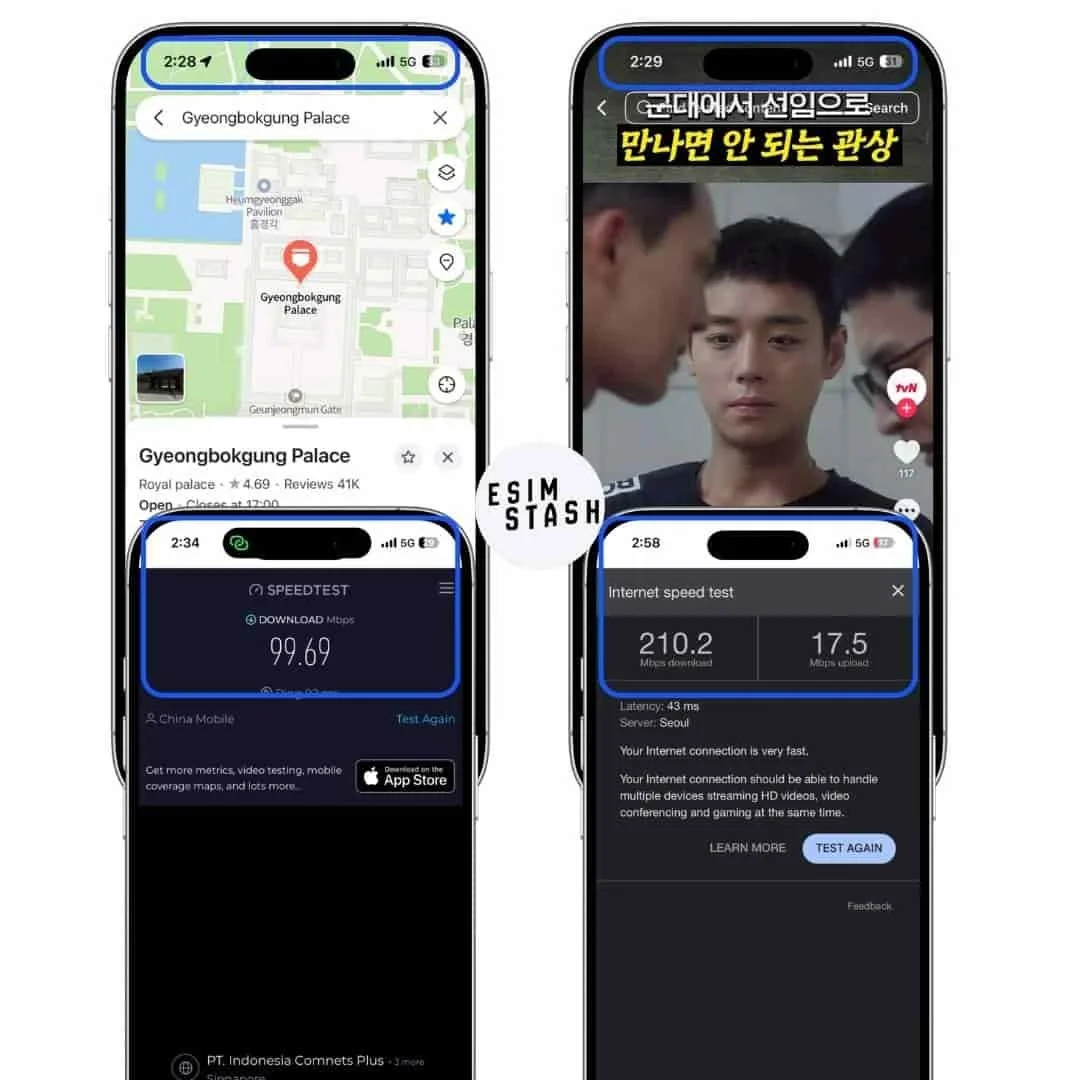
As Google's own speed test noted, the connection was "very fast," and 5G remained consistently active throughout. Beyond the numbers, Naver Map loaded directions around Gyeongbokgung Palace almost instantly and TikTok played without buffering the moment I opened it. I would want to balance this by flagging something off about the experience, but I genuinely encountered nothing of the sort. At least in Seoul, connecting to LG U+ through Yesim felt very close to using a local Korean SIM card.
5. Mobile Hotspot
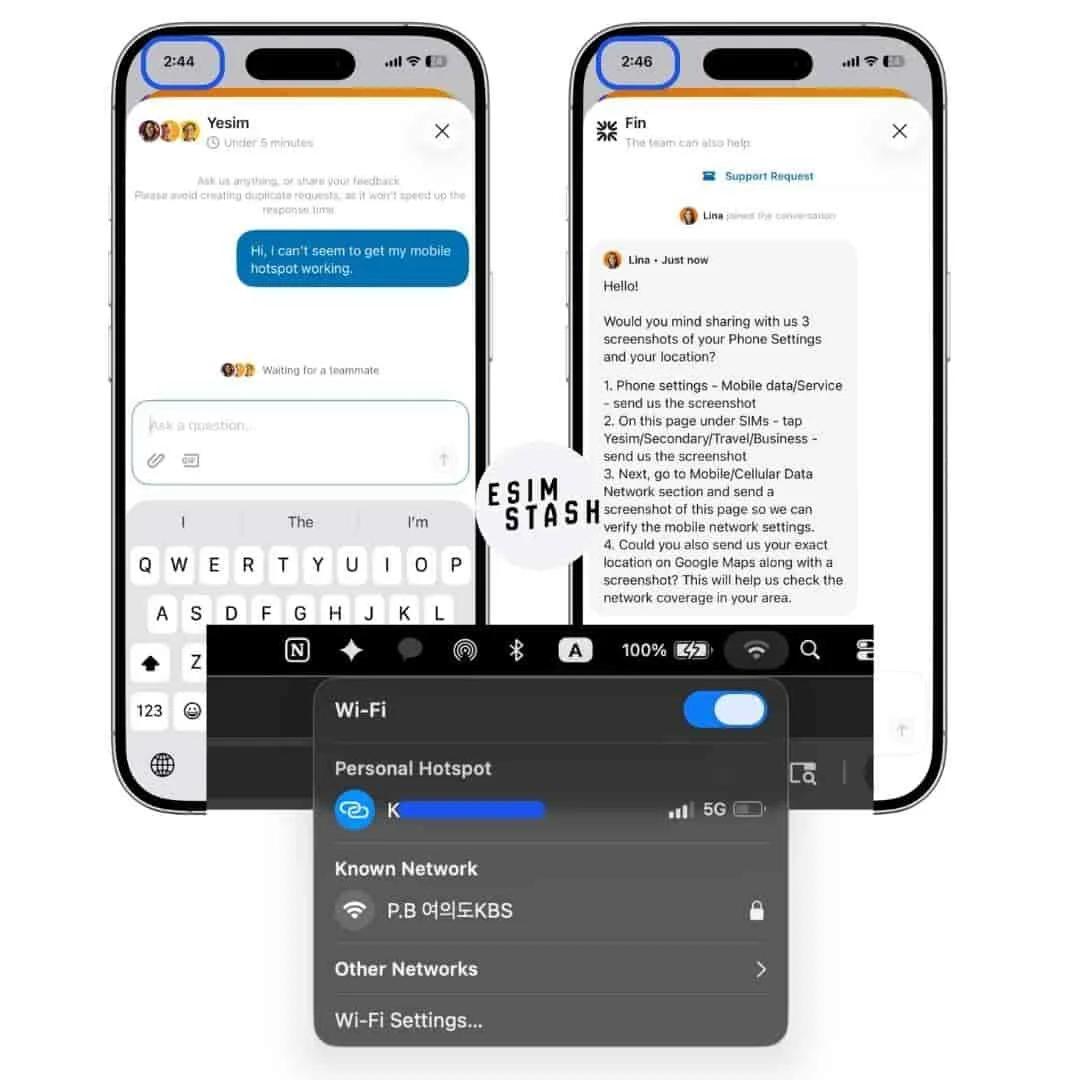
Testing mobile hotspot is something I do for every eSIM review since it matters for travelers with multiple devices. As shared in the Speed section above, I connected my MacBook to my iPhone via Yesim's hotspot during testing.
Mobile hotspot worked, but not without a minor hiccup first. My laptop was not connecting even though browsing on my phone was completely normal. At 2:44 PM, I contacted Yesim's customer service for assistance.
By 2:46 PM, Lina from their support team joined the conversation. She asked me to share screenshots of my phone settings and my location. I thought it was a bit odd to send a screenshot of my location, but Lina did clarify that it would help them check the network coverage in my area.
While preparing those screenshots, I noticed my MacBook had already connected to the hotspot on its own. Whether it just needed more time to establish the connection, I am not quite sure. Either way, I successfully connected my laptop, as Yesim claims is possible on their website.
6. Unlimited Data
I purchased a fixed data plan for my South Korea test, so I did not personally use Yesim's unlimited option. However, it is worth noting how their unlimited plans work before buying.
Yesim's unlimited plans come in fixed durations of 1, 7, 15, and 30 days, which covers anything from a quick stopover to a full month abroad (like the popular 1-month stay in Jeju Island). For comparison, BNESIM currently offers a 10-day option as their standard duration, which may not suit travelers whose trips fall outside that window.
One thing to be aware of before choosing unlimited is Yesim's Fair Usage Policy. Based on my research, any speed reductions appear to come from the local network operator rather than Yesim directly. This means your connection can slow down during heavy usage periods, even on an unlimited plan.
This came up in a Reddit thread on r/eSIMs I found while researching this review, where a traveler reported speeds dropping to around 5 Mbps after two days of heavy streaming in Portugal. Yesim does disclose the Fair Usage Policy on their website, so it is not hidden. But it is a tradeoff worth knowing before you buy, especially for long trips or high-data use cases.
7. VPN
I did not personally test Yesim's built-in VPN during my South Korea trip. South Korea has relatively open internet access, so there was no practical reason to activate it during my stay.
What I can confirm from Yesim's website and app is that the free VPN is available for iPhone users only. Android users do not get access to this feature at no extra cost. This matters most for travelers heading to countries with internet restrictions, like China, where accessing platforms like TikTok, Instagram, and Google requires a VPN. If that is your use case, Yesim's iOS VPN inclusion is a genuine advantage worth factoring into your decision.
8. Phone Number
Yesim also offers virtual phone numbers as an add-on. However, it was not exactly what I had expected.
Their virtual number is mostly designed to receive OTPs, the one-time verification codes that certain apps and services send during login or account setup. It is not designed as a primary number for traditional calls and texts.
For staying in touch while traveling, apps like WhatsApp, FaceTime, KakaoTalk, and Facebook Messenger work well over data and do not require a local number. If you specifically need a number that supports actual calls and texts, aloSIM is worth looking at as it offers a free international number as part of their plan.
9. Call & Text Plan
No call and text plan was available for South Korea on Yesim's website at the time of my test.
10. Reusable eSIM
Another feature worth knowing about Yesim eSIM is that it is reusable. Once installed on your device, you do not need to go through the installation process again for future trips. You can simply top up your existing eSIM or purchase a new plan directly through the app, which saves time every time you travel.
I was only able to confirm this from Yesim's app and website during my South Korea test. I have not yet personally tested the top-up experience across multiple countries, so this section is based on what I observed. I will update this section on eSIMStash once I have tested Yesim on a second trip.
11. Interface
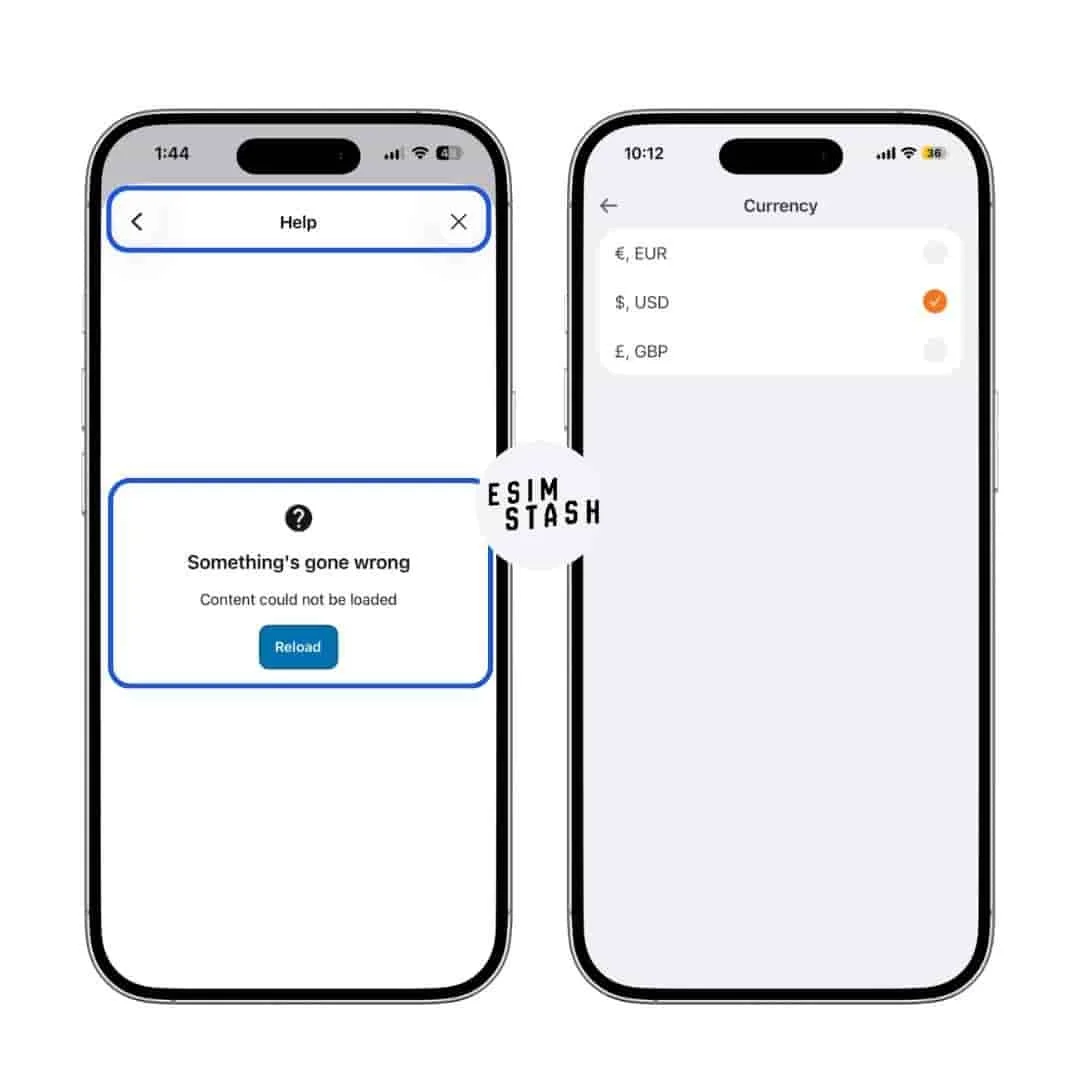
Overall, the Yesim app is user-friendly. Help buttons are easy to find and the layout is straightforward enough for first-time eSIM users to navigate without much friction. The Korean language translation was also accurate during my testing, which is a small detail I appreciated.
Nevertheless, there are a couple of things that I think could be improved. When I was logged out of the app, I could not access the Help Knowledge Base. It only became available after logging back in, which is an odd restriction if you need support before your account is fully set up (I only tested it once, so this could be just a blip). I also noticed that currency display is limited to three options. Since I was testing in South Korea, having the option to view prices in Korean Won would have been more practical.
Field Notes
—During my test, I also tried to locate Yesim's Trip Calculator feature, which I had seen on their website. I could not find it in the app. It is possible it was moved, removed, or only accessible via the web version. For a feature that is supposed to help users choose the right plan, not finding it in the app may be a bit frustrating.
12. Refund Policy
For this test, I did not need to request a refund since the eSIM worked as expected. What I did observe is that Yesim clearly published their refund policy on their website, which I found reassuring. Providers that post their refund terms openly tend to stand behind their product more confidently than those that bury or omit them. I would check their latest policy directly on their website before purchasing.
13. Customer Support
I contacted Yesim's support team two times during my test. The first was with Nick, who confirmed that eSIM installation is possible before arriving at your destination. The second was with Lina, who assisted with my mobile hotspot troubleshooting and responded within 2 minutes with specific, helpful instructions.
Both interactions involved real human responses, not automated replies. For a travel product where you may need quick help in an unfamiliar country, that response time and quality matters. Based on my experience, Yesim's support team is one of the stronger aspects of their service.
14. Referral Rewards
Yesim offers a referral program that can earn you up to EUR 75 in rewards. One thing to note before counting on it: your referral code only activates once you have spent at least EUR 5 on the platform. So you need to make a qualifying purchase first before your code becomes shareable. Once active, the rewards are generous.
15. Cashback

Yesim offers 5% cashback on every purchase, and I can confirm this from personal experience. I received my cashback after completing my South Korea plan purchase. The cashback is credited as Ycoins, Yesim's in-app currency, which can be used toward future plan purchases.
Final Take
Yesim is not the cheapest eSIM on the market, but it delivered on what I actually needed during my trip to Seoul.
The free VPN for iPhone users is a genuine bonus, especially for travelers heading to China. The unlimited plans are flexible and come in durations that fit most trip lengths. The 5% cashback and referral rewards add long-term value if you travel regularly.
Where Yesim falls short is pricing for fixed data plans, particularly in destinations where BNESIM offers significantly cheaper rates for the same data and validity period. The VPN being iOS-only and the lack of a voice plan are also limitations worth knowing before you buy.
If you are a leisure traveler (especially a frequent one), a remote worker, or someone who values a reliable connection without the hassle, Yesim is a solid choice. If budget is your only consideration, BNESIM is worth comparing first.
If you decide on Yesim, use code ESIMSTASH to save 15% on any plan, tested and verified June 2026.
FAQs About Yesim eSIM
1. Is Yesim compatible with my phone?
Yesim works with most modern eSIM-compatible smartphones. I personally tested it on an iPhone 15 Pro without any issues. For the full list of supported devices, check Yesim's official compatible devices page directly as the list is updated regularly. Check compatibility devices →
2. What is an eSIM?
An eSIM (embedded SIM) is a digital SIM card built into your phone. Instead of inserting a physical SIM, you download a mobile plan directly to your device. This means you can get connected in a new country without visiting a store or swapping cards. We have a full explainer on eSIMStash — link coming soon.
3. Do I need to turn on data roaming to use Yesim?
Yes, in most cases. During my installation, turning on Data Roaming under my Yesim eSIM settings was one of the required steps before I could connect. This is standard for eSIMs and does not mean you will be charged roaming fees by your home carrier, as long as you switch your Cellular Data to Yesim and turn off your primary SIM. A Reddit user on r/eSIMs reported confusion about this exact step, so it is worth double-checking your settings if you are not connecting after installation.
4. Does Yesim slow down after heavy use?
It can, depending on your usage and destination. Yesim operates under a Fair Usage Policy, meaning the local network operator may reduce your speeds once you consume a significant amount of data. One Reddit user on r/eSIMs reported speeds dropping to around 5 Mbps after two days of heavy streaming in Portugal. Yesim discloses this policy on their website, so it is worth reading before purchasing an unlimited plan for work or high-data use.
5. Can I use Yesim eSIM in China?
Yes, and I noticed Yesim listed China as one of their popular destinations. iPhone users get access to Yesim's built-in VPN, which helps bypass internet restrictions and access platforms like TikTok, Instagram, and Google. Android users do not have access to the free VPN. For trips longer than two weeks with heavy data use, read the Fair Usage Policy carefully before committing.
6. Can I install Yesim before I travel?
Yes. The app may show a warning suggesting you wait until arrival, but the confirmation email I received after purchase states that home country installation is possible. I also verified this directly with Nick from Yesim's support team. The eSIM will only connect to a network once you are physically in your destination country.
7. Does Yesim support calls and texts?
Not in the traditional sense. Yesim offers virtual phone numbers as an add-on, but these are primarily useful for receiving OTPs rather than making calls or sending SMS. For calls and messaging, data-based apps like WhatsApp, FaceTime, and KakaoTalk work well over data. If you need a plan with actual call and text support, aloSIM is worth considering.
8. How long does Yesim installation take?
In my test, installation and activation took 4 minutes from clicking the activation link to getting a 5G connection in Seoul, not counting a 2-minute blooper where I missed a couple of settings steps.

Purchase Receipt
I personally purchased this eSIM using my own account. Below is the receipt confirming the transaction.
How We Test
Every eSIM reviewed on eSIMStash is personally purchased and tested by KJ. Testing includes installation time, speed tests at multiple points in the day using both Ookla and Google's Internet Speed Test, mobile hotspot performance, real-world app usage, and at least one interaction with the provider's customer support team. Screenshots and receipts are documented throughout.
This Yesim review reflects testing conducted in Yeouido, Seoul, South Korea in May 2026 on an iPhone 15 Pro. Read our full testing methodology →